Tuesday, April 16, 2019

Google Search console affected by indexing bug

Google search console or webmaster tool is recently affected by indexing bug and that issue is resolved in 2nd week of April 2019 but Google search console is still affected by indexing bug and still recovering from this bug.
Website owners may notice this point that their recent reports of coverage and enhancement are not updated in search console. In the additional issue, the URL inspection tool is used to resubmit the URL of websites but the status report of submission of URL’s is not correct.

Google Search console affected by indexing bug, google search console bug 2019, Google Search console affected by indexing bug 2019, Google search console update 2019
Google Search console affected by indexing bug in 2019
Recently Google provides the news of bug fixing that issue of Google search console is resolved, but this issue is resolved just in search page results. So, your pages are still indexed in Google search engine but search console still giving indexing error. In, order to ensure that your web pages are index in the search engine you have to use Google operator (site) to check whether your web pages are indexed are not.
Like this: site:www.xenex-media.com.au
After this your website still not index in the search engine, then there is a bug while indexing your website. For this, you need to submit a thread to the webmaster community message board and your issue will be resolved soon or you will get different solutions against your problem.
This indexing bug issue happened on 4th April 2019 and different website owners report this issue to the webmaster community that their web pages were missing from Google index.
On 6th April 2019, Jhon Mueller confirm this issue that there is a technical issue in Google search console while indexing the web pages. Then Google starts updating the audience about this issue on their account throughout the week.
On the 10th of April 2019, Google confirms that this issue is resolved in search results only not in search console.
But now on 16th of April 2019, this indexing bug is still in search console and Google is still trying to resolve this issue and hope so this issue will be in 2019 soon.


Thursday, April 11, 2019

How to Create a content strategy in 2019

WHAT IS A CONTENT STRATEGY?

Content strategy means to manage the tangible media which is created or owned by you like: written data, video etc. Content strategy is a part of the digital marketing plan which is continuously updated and show what are your expertise. Here will discuss How to create a content strategy in 2019.
How to Create a content strategy in 2019

How to create a content marketing strategy in 2019?

DEFINE YOUR GOALS/BUSINESS GOALS

 What is your aim for creating a content marketing strategy?. Why do you need to create a content strategy in your marketing plan?. For this you need to know about your goals before content marketing planning, so you can easily determine which strategy is best for you.
Develop a persona research
To create or develop a successful plan you need to know what is your targeted audience. This research is important for those who are starting out or are new in marketing. By knowing your exact audience you can easily create relevant and updated content for your audience on the daily base and you can easily convert them into your valuable clients.
If you are an experienced marketing expert you can easily change your targeted audience or expand your audience in your content marketing strategy.

RUN CONTENT AUDIT

Most of the marketers or people start blog posting, but if you want to venture out and try to produce other pieces of content. For example, if you’re performing weekly blog posting for the past year, creating Ebook that contains all of your blog posts into one ultimate E-guide which is a different form of offering information to your audience.

CHOOSE A CONTENT MANAGEMENT SYSTEM

Now you need to choose a content management system where you can easily manage your content. A few major parts of content management include
  1. Content creation
  2. Content Publication
  3. Content analytics
For content management, you can use the WordPress content management system where you can easily manage your content and check analytics of your content without any problem. If you are part of Xenex Media you can get our Digital Marketing Services Gold Coast which helps you to create a content strategy and manage the whole content of your business.

BRAINSTORM CONTENT IDEAS

Now you need to start brainstorming for new content or post ideas for your content project. Here some tools that will help you to create new content ideas for your project.
How to Create a Content Strategy in 2019, content strategy plan, how to create a content strategy, content strategy
How to Create a content marketing strategy in 2019

DECIDE WHICH TYPE OF CONTENT YOU WANT TO CREATE

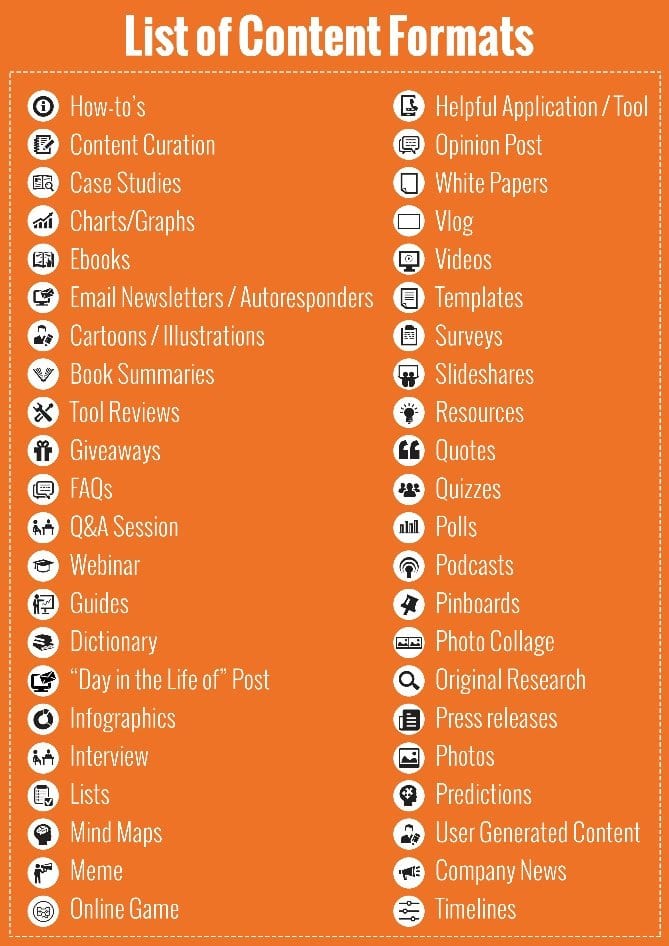
There are many options or types of content that you can easily create by yourself or by using different tools. Here is some of the most popular content types that you can create for your content marketing.

TYPES OF CONTENT MARKETING

  1. Blog Posts
  2. Ebooks
  3. Case Studies
  4. Templates
  5. Infographics
  6. Videos
  7. Podcasts
  8. Social Media
content strategy plan, how to create a content strategy, content strategy
How to create a content strategy (Hubspot)

PUBLISH  AND MANAGE YOUR CONTENT

Now in the last step, you need to create a strategy of publishing and managing the content that you create for your audience and business. To manage your content you need to create editorial calendars and Social media editorial calendar which helps you to easily manages your content posts or data. Social Media editorial calendar helps you to manage your content on different social media platforms so you can easily create and maintain your content data.

Wednesday, April 10, 2019

WordPress Web Design Trends You Need to Adopt in 2019

A few years back creating a website is very easy, just you need to choose a template and start posting on your website and people start visiting your website within a short time and you don’t need to implement the SEO strategies on your website. But now the whole trend is changing for web designing and SEO. if you want to create your online presence you need to create a proper web design and SEO strategies to boost your traffic and online business. Here, we are going to discuss some WordPress web design trends you need to adopt in 2019 for your business.
  1. Drag & drop web page builders
  2. Video headers in WordPress website themes
  3. VR (Virtual reality) in WordPress theme
  4. Focus on mobile friendly design
WordPress Web Design Trends You Need to Adopt in 2019, wordpress web design, wordpress web design 2019, wordpress web design trends, wordpress web design trends 2019
WordPress Web Design Trends You Need to Adopt in 2019

Drag & drop web page builders

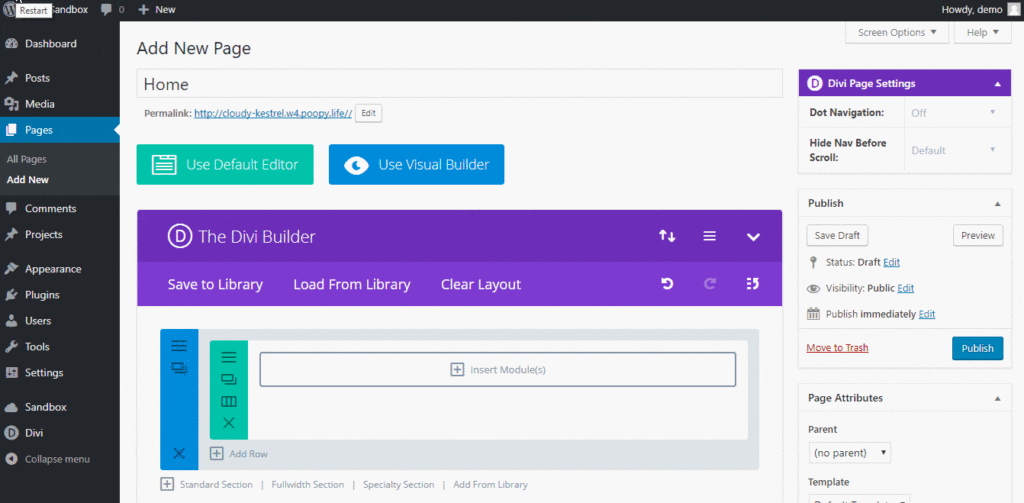
Drag & drop web page builder is one of the main functionality of WordPress that is used to create or develop different websites just by drag and drop the components of the website. This feature helps the designers or developers to create or design a website without the knowledge of Php and HTML. They can easily create their websites for their business to show their online presence.
WordPress Web Design Trends You Need to Adopt in 2019, wordpress web design, wordpress web design 2019, wordpress web design trends, wordpress web design trends 2019
WordPress Web Design Trends You Need to Adopt in 2019

Video headers in WordPress website themes

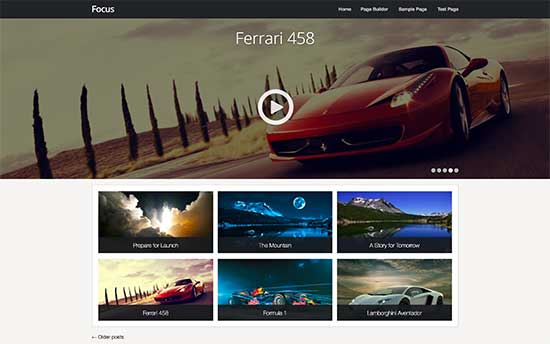
Due to huge increment in internet speed, now it’s very easy to play videos on mobile phones. That’s why WordPress include video functionality in WordPress themes, which helps a user or a developer to add videos in their website header. A video makes a website more informative and attractive for the visitors so, they can easily understand and learn about the business or a website by watching the videos. Many online businesses show their services or products by using this video feature.
WordPress Web Design Trends You Need to Adopt in 2019, wordpress web design, wordpress web design 2019, wordpress web design trends, wordpress web design trends 2019
WordPress Web Design Trends You Need to Adopt in 2019

VR (Virtual reality) in WordPress themes

Virtual reality apps are helping people to market their products or services online in this modern age that will help an online business to boost their online presence. Now WordPress developers are also creating Virtual reality plugins that will help to create virtual reality tours for their business to show their online presence to their customers.
WordPress Web Design Trends You Need to Adopt in 2019, wordpress web design, wordpress web design 2019, wordpress web design trends, wordpress web design trends 2019
WordPress Web Design Trends You Need to Adopt in 2019

Focus on mobile friendly design

In the WordPress website, design trends design is one of the famous and important trends in WordPress development.Google is now considering AMP pages as a ranking factor in SEO and WordPress web designing trends 2019. AMP pagesare very fast in loading that’s why Google considering AMP pages as a ranking factor due to their loading speed.
Now in WordPress, developers are focusing on developing AMP plugins that convert Web pages into AMP pages and now AMP pages are one of the major and important trends in 2019.
WordPress Web Design Trends You Need to Adopt in 2019, wordpress web design, wordpress web design 2019, wordpress web design trends, wordpress web design trends 2019
WordPress Web Design Trends You Need to Adopt in 2019

Conclusion

The 2019 year is going to be an exciting year for the WordPress developers because WordPress community adopting these trends fastly to improve their online business and increase their revenue and leads. Now as a WordPress blogger or content strategy creator, this is the right time to formulate or develop your website in WordPress that will help you to adopt these trends easily or if you want to hire a web design gold coast company for your business you have to check that, are they developing their client’s website in WordPress or not.